User:Lenyskills
From Bo3b's School for Shaderhackers
Revision as of 03:57, 21 June 2017 by Lenyskills (Talk | contribs)
Contents
Lesson 0: ok, it's easy ...

Lesson 1: A little scary, Yes!
My first shader file of the entire ball
// Annoying bloom on ball light
//
// Generated by Microsoft (R) HLSL Shader Compiler 9.27.952.3022
//
// Parameters:
//
//   sampler2D Texture2D_0;
//   float UniformPixelScalar_7;
//   float4 UniformPixelVector_0;
//   float4 UniformPixelVector_3;
//   float4 UniformPixelVector_4;
//   float4 UniformPixelVector_5;
//   float4 UniformPixelVector_6;
//
//
// Registers:
//
//   Name                 Reg   Size
//   -------------------- ----- ----
//   UniformPixelVector_0 c0       1
//   UniformPixelVector_3 c4       1
//   UniformPixelVector_4 c5       1
//   UniformPixelVector_5 c6       1
//   UniformPixelVector_6 c7       1
//   UniformPixelScalar_7 c8       1
//   Texture2D_0          s0       1
//

    ps_3_0
    def c1, 0.5, 1, -0.5, 0
    def c2, 3, 0, 0, 0
    dcl_texcoord v0.xy
    dcl_texcoord1 v1
    dcl_texcoord2 v2.y
    dcl_texcoord4 v3.w
    dcl_2d s0
    add r0.xy, c1.z, v0
    mov r0.w, c1.w
    dp2add r1.x, c5, r0, r0.w
    dp2add r1.y, c6, r0, r0.w
    add r0.xy, r1, c1.x
    texld r0, r0, s0
    mad_sat r0.y, v2.y, -c1.x, c1.y
    mul r0.yzw, r0.y, v1.xxyz
    mul r0.yzw, r0, v1.w
    mul_sat r0.xyz, r0.yzww, r0.x
    mul r1.xyz, r0, c4
    mad r0.xyz, c4, -r0, r0
    mad r0.xyz, c8.x, r0, r1
    mul r0.xyz, r0, c4.w
    mul r0.xyz, r0, c7
    mov r1.x, c2.x
    mad_pp r0.xyz, r0, r1.x, c0
    mul_pp oC0.xyz, r0, v3.w
    mov oC0.w, c1.w

// Disable game-breaking bloom effect
mov oC0.xyzw, c1.wwww

// approximately 21 instruction slots used (1 texture, 20 arithmetic)
Lesson 2
Done ! First effect disabled.
Before :
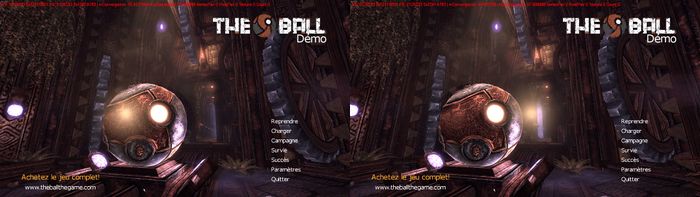

After :


Lesson 3
I changed numpad 0 to numpad *
[General]

// UseRenderedShaders=true is nearly always useful, because it trims the
// list of shaders seen while hunting down to just those active in the
// current scene.  Disable this only if you get crashes during hunting.
UseRenderedShaders=true

// DumpAll will generate ASM text files for every shader seen by the game.
// This is usually worth doing once, but not useful for every run.
DumpAll=false

// Constant registers that will arrive in Vertex and Pixel Shaders, as
// c220.  The constants below will be assigned, based on the key preset.
DefVSConst1 = 220
DefPSConst1 = 220

// The PresetKeysList specifies which KEYs will be used.
// Multiple keys lists are supported.
PresetsKeysList = 1;

// For this single key example, we only need one keylist, KEY1. This specifies
// that the Numpad * keyboard key (Key=106) should act as a momentary. Which will change the Const1 being
// passed to the shader code from 1.0 to 0.0 as floating point numbers.
// Type=1 is toggle, Type=2 is momentary.
[KEY1]
Key = 106
Presets = 1;2;
Type = 2

// Constants that will be sent to every shader through constant register c220.
// The Const1 tells us that we'll need to use c220.x to compare against these
// values.  Const2 would be seen as c220.y.
// 0x3f800000 is 1.0 in floating point hex, 0x00000000 is 0.0 in hex
// UseByDef specifies which constant is the default starting value.
[PRES1]
Const1 = 0x3f800000
[PRES2]
UseByDef=True
Const1 = 0x00000000
Color changed!
// if Const1 = 0 disable effect, else leave it on
mov r30.x, c220.x
if_eq r30.x, c200.x
   mov oC0.xyzw, c200.wyww
endif

Lesson 4
[General]

// UseRenderedShaders=true is nearly always useful, because it trims the
// list of shaders seen while hunting down to just those active in the
// current scene.  Disable this only if you get crashes during hunting.
UseRenderedShaders=true

// DumpAll will generate ASM text files for every shader seen by the game.
// This is usually worth doing once, but not useful for every run.
DumpAll=true

// Constant registers that will arrive in Vertex and Pixel Shaders, as
// c220.  The constants below will be assigned, based on the key preset.
DefVSConst1 = 220
DefPSConst1 = 220

// The PresetKeysList specifies which KEYs will be used.
// Multiple keys lists are supported.
PresetsKeysList = 1;2;

// This specifies
// 1- that the Numpad 0 keyboard key (Key=96) should act as a toggle. Which will change the Const1 being
// passed to the shader code from 1.0 to 0.0 as floating point numbers.
// 2- that the Numpad * keyboard key (Key=106) should act as a toggle. Which will change the Const2 being
// passed to the shader code from 1.0 to 0.0 as floating point numbers.
// Type=1 is toggle, Type=2 is momentary.
[KEY1]
;'0' key (toggles annoying bloom with fog)
Key = 96
Presets = 1;2;
Type = 1
// Constants that will be sent to every shader through constant register c220.
// The Const1 tells us that we'll need to use c220.x to compare against these
// values.  Const2 would be seen as c220.y.
// 0x3f800000 is 1.0 in floating point hex, 0x00000000 is 0.0 in hex
// UseByDef specifies which constant is the default starting value.
[PRES1]
Const1 = 0x3f800000
[PRES2]
UseByDef=True
Const1 = 0x00000000
[KEY2]
;'*' key (toggles annoying bloom without fog)
Key = 106
Presets = 3;4;
Type = 1
[PRES3]
Const2 = 0x3f800000
[PRES4]
Const2 = 0x00000000
UseByDef=True

